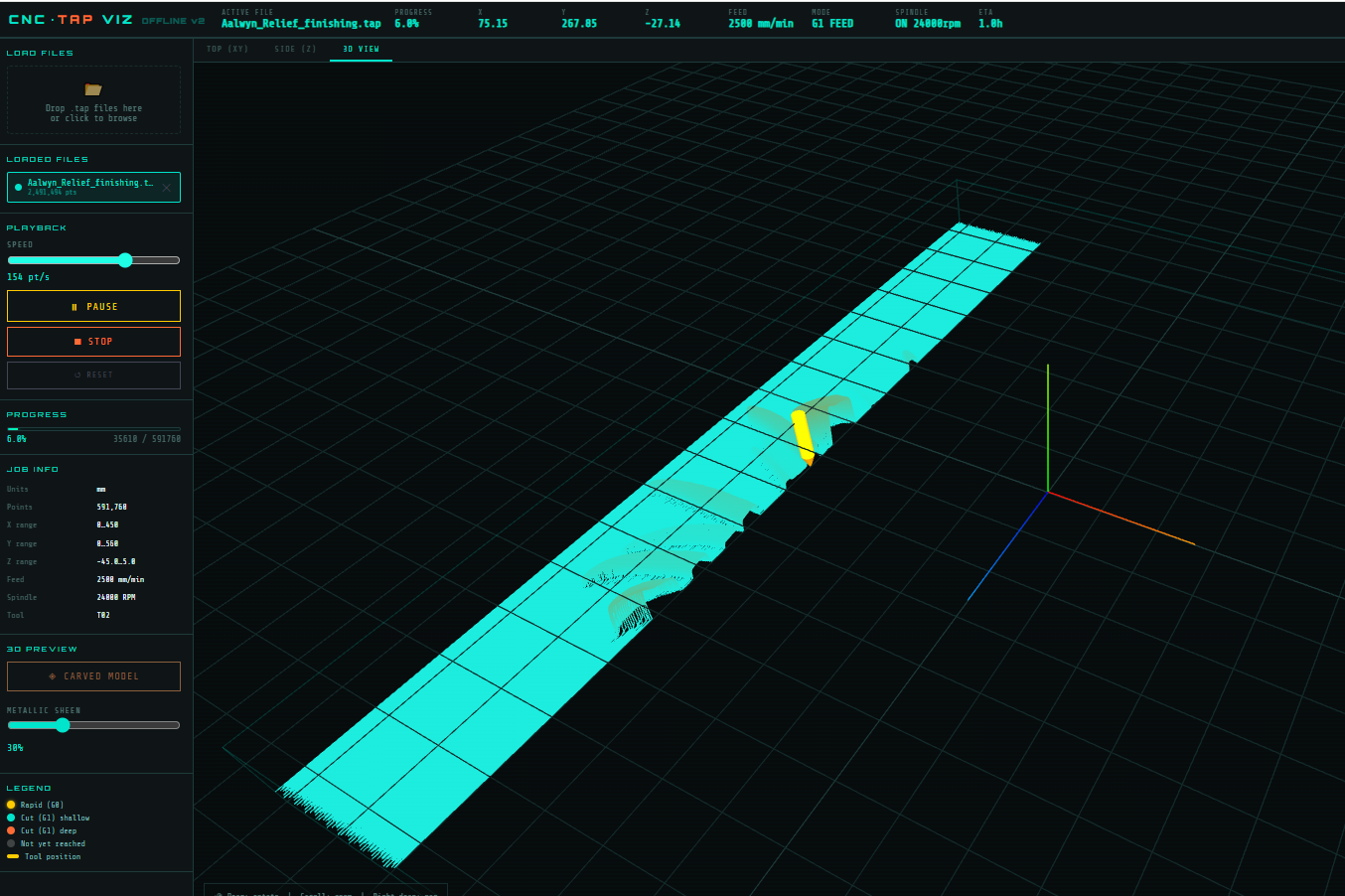
A browser-based visualizer for CNC .tap / .nc / .gcode files. Runs entirely offline — no server, no install. Drop a file in and watch the toolpath play back.
Animates the toolpath with adjustable playback speed (0.05 pt/s up to 5k pt/s)
Three views: Top (XY), Side (XZ), and a full 3D orbit view via Three.js
Colour-codes moves by depth — shallow cuts in cyan, deep cuts in orange, rapids in yellow
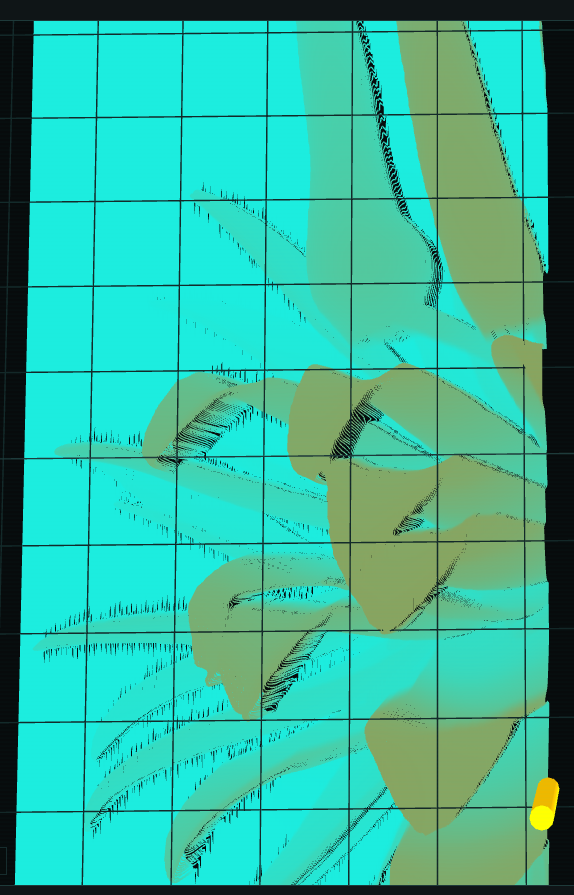
Builds a carved mesh from the toolpath so you can preview what the stock will look like after machining
Multi-file support with per-file colour assignment
Shows live X/Y/Z position, feed rate, spindle state, and ETA during playback
3D view
The 3D view renders the full toolpath as line segments with depth-mapped colouring. Left-drag rotates, scroll zooms, right-drag pans.
Carved model
The carved model is built by walking every toolpath segment and recording the minimum Z reached at each grid cell (120×120). The result is a height-mapped mesh showing which areas have been cut and how deep. Useful for catching missed regions or checking depth consistency before running the job.
G-code support
1
2
3
4
5
6
7
8
G0  — rapid positioning
G1  — linear feed move
G81 — canned drill cycle (with R-plane retract)
G80 — cancel canned cycle
G20 / G21 — inch / mm units
S   — spindle speed
T   — tool number
F   — feed rate
Implementation notes
No build step. Single HTML file with an inline <script> block.
Three.js loaded from CDN (r128). Everything else is vanilla JS.
Large files (>80k points) are downsampled while preserving rapids, Z-direction changes, and the first point after every rapid. A 600k-point finishing file samples down to ~80k without losing the toolpath shape.
The carved mesh walks segments using a Bresenham-style interpolation so long roughing strips fill every grid cell between endpoints, not just their start and end.
Speed slider uses a log scale: slider position 1–1000 maps to 0.05–5000 pt/s.
Limits are the foundation on which derivatives and integrals are built. A limit describes the value a function approaches as its input approaches a point — the function need not be defined at that point. Continuity asks whether the function actually attains that value, or whether something fails at the point.
Definition of a limit
Consider:
$f(x) = (x^2 - 1) / (x - 1)$
At x = 1 the expression is undefined (0/0). Evaluating near x = 1 — at x = 0.99, 0.999, 1.001, 1.01 — the outputs approach 2. The limit is 2, even though f(1) does not exist.
Three standard approaches to evaluating a limit:
Graphically — inspect whether both sides converge to the same value.
Numerically — tabulate f(x) for inputs approaching a and observe the trend.
If $h(x) \le f(x) \le k(x)$ near a, and $\lim_{x \to a} h(x) = \lim_{x \to a} k(x) = L$, then $\lim_{x \to a} f(x) = L$.
A standard application is $\lim_{x \to 0} \sin(x)/x = 1$, established via the bounds $\cos(x) \le \sin(x)/x \le 1$ for $x$ near 0. Both bounds converge to 1, so $\sin(x)/x$ is squeezed to 1 as well.
1 2 3 4 5 6 7 8 9 10 11 12 13
import numpy as np import matplotlib.pyplot as plt
x = np.linspace(-1.5, 1.5, 400) x = x[np.abs(x) > 1e-6]
from __future__ import absolute_import, division, print_function, unicode_literals
import warnings
warnings.filterwarnings("ignore")
import pathlib
import matplotlib.pyplot as plt
import pandas as pd
import seaborn as sns
import tensorflow as tf
from tensorflow import keras
from tensorflow.keras import layers
print("Tensorflow Version : " + tf.__version__)
import sys
print("Python Version : " + sys.version)
from tensorflow.python.client import device_lib
print(device_lib.list_local_devices())
from sklearn import preprocessing
import numpy as np
from numpy.random import seed
import winsound
import os
AI Model Save
These variables allow for the AI model to be saved.
model = build_model() model.summary() # Display training progress by printing a single dot for each completed epoch classPrintDot(keras.callbacks.Callback): defon_epoch_end(self, epoch, logs): if epoch % 100 == 0: print('') print('.', end='')
EPOCHS = 1000
# The patience parameter is the amount of epochs to check for improvement early_stop = keras.callbacks.EarlyStopping(monitor='val_loss', patience=100)
# Create a callback that saves the model's weights cp_callback = tf.keras.callbacks.ModelCheckpoint(filepath=checkpoint_path, save_weights_only=True, verbose=0)
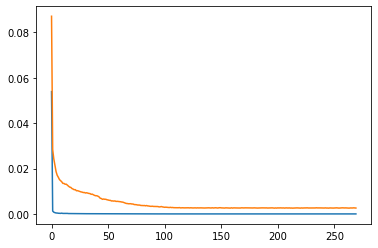
loss, mae, mse = model.evaluate(normed_test_data, test_labels, verbose=0) print("Testing set Mean Abs Error: {:6.4f}".format(mae)) print("Testing set Mean Squared Error: {:6.4f}".format(mse))
1
2
Testing set Mean Abs Error: 0.0011
Testing set Mean Squared Error: 0.0002
The model can predict the closing price of the next bar with a MAE(mean absolute error) of 11 pips. Cross validation will make the result more robust. A LSTM network would yield better results.
Welcome to Hexo! This is your very first post. Check documentation for more info. If you get any problems when using Hexo, you can find the answer in troubleshooting or you can ask me on GitHub.